Since version 1.3, the Matter standard has included support for energy monitoring. Devices that support this feature can report information like power usage in watts or energy consumption in kilowatt-hours (kWh) – a key requirement for energy management within Matter-based smart homes.
The measured values can be used, for example, to create automations if a threshold value is exceeded or not reached. Compatible Matter ecosystems can also display real-time power usage, adding a new level of transparency to smart home energy consumption.

Requirements for Energy Reporting in Matter
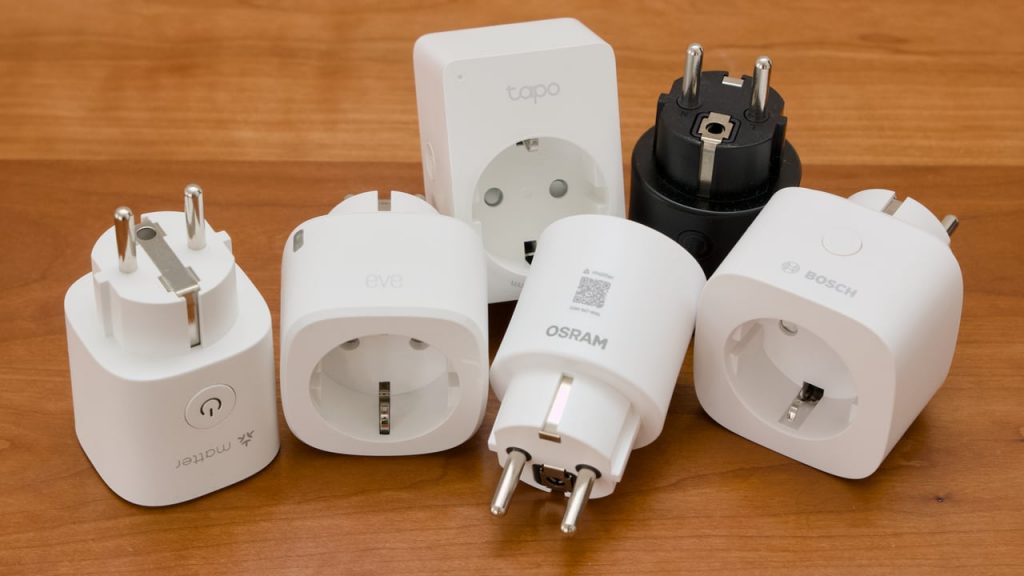
Smart plugs were among the first product categories to take advantage of the new capabilities. Both Wi-Fi- and Thread-based models are available that can transmit energy data. However, it’s not enough for the outlet to be technically capable of measuring energy consumption. It must also transmit these values in the Matter format.
That’s not always the case – even if the packaging features a Matter logo. Some manufacturers only support turning the smart plug on and off via Matter. For information about energy usage – if available – they require their own app. To ensure that the measured values are available across plattforms, three requirements must be met:
1. The smart plug itself supports at least Matter version 1.3. Many first-generation models still run on versions 1.0, 1.1, or 1.2 and therefore don’t support energy monitoring. These devices require a firmware update to enable reporting. If the manufacturer doesn’t provide updated firmware, the plug can’t be used as an energy meter. The following models do support energy reporting – tested by me with the specified firmware version, but likely to work with newer updates as well:
These Matter Plugs Support Energy Measurement
| Manufacturer / Brand | Model | Radio | Starting with firmware |
|---|---|---|---|
| Aqara | Power Plug H2 EU / EU RGB | Thread | 0.0.5.0 |
| Bosch Smart Home | Zwischenstecker kompakt [+M] | Thread | 1.00.09 |
| Eve Systems | Eve Energy EU / CH / UK / US / AU | Thread | 3.5.0 |
| Ikea | Grillplats | Thread | 1.4.6 |
| Meross | WiFi Plug Mini MSS315 | Wi-Fi | 9.3.26 |
| Ledvance / Osram | Smart+ Plug EU / CH / UK | Wi-Fi | 1.1.0 |
| Ledvance / Osram | Smart+ Compact Outdoor Plug EU | Wi-Fi | 1.1.0 |
| TP-Link | Tapo P110M | Wi-Fi | 1.3.2 |
2. The Matter ecosystem hosting the smart plug must also be updated to version 1.3 or later. If it isn’t, the plug’s energy data won’t be transmitted through the network. Only some platforms have upgraded to support this functionality. The following systems have been tested by me with the specified versions and should also work with newer software releases.
These Matter Platforms Support Energy Reporting
| Provider | Platform / Ecosystem | from Software version |
|---|---|---|
| Aqara | Aqara Home | 4.3.7 |
| Athom | Homey Pro | 12.4.1 |
| Home Assistant | Home Assistant | 2024.10 / Matter Server 6.x |
| Ikea | Dirigera Hub | 2.805.6 (Beta) |
| Ledvance | Smart+ App | 2.1.22 |
| Samsung | SmartThings | n.a. |
| Tuya | Tuya-enabled Apps | n.a. |
3. The smart home app must display the measured energy data on its user interface. Updating to Matter 1.3 or 1.4 alone isn’t enough – the app must actually show the energy readings on screen. The platforms listed above meet this requirement as well (see below).

Differences in the Data Transmitted
Differences aren’t limited to the Matter platforms alone; the smart plugs themselves also determine which data they provide. Power (W), current (A), voltage (V) an energy (kWh) are always included – with additional information depending on the manufacturer. For example, the smart plugs from Bosch Smart Home and TP-Link report not only the kilowatt-hours consumed but also the energy fed into the plug – such as from a balcony power plant – as a separate data point.
At Ledvance, you can switch the display in the system’s own Matter Controller, the Smart+ app: it has an “energy generation mode” that shows the money saved and CO₂ equivalents alongside measured values. Not all platforms offer this switching option. In that case, the Ledvance plug delivers a value for kilowatt-hours – without distinguishing which direction the electricity is flowing. On some plugs, Matter can also be used to configure the power-restoration behavior: whether the plug should turn on, remain off, or revert to its last state after a power outage.
A comparison of the features in Home Assistant highlights the differences:
| Data provided by the plug | Bosch | Eve | Ikea | Meross | Ledv. | TP-Link |
|---|---|---|---|---|---|---|
| Power (W) | yes | yes | yes | yes | yes | yes |
| Active current (A) | yes | yes | yes | yes | yes | yes |
| Voltage (V) | yes | yes | yes | yes | yes | yes |
| Energy (kWh) | yes | yes | yes | yes | yes | yes |
| Energy fed into the grid (kWh) | yes | no | n.a. | no | no* | yes |
| Reactive power (var) | yes | no | yes | no | no | no |
| Reactive current (A) | yes | no | yes | no | no | no |
| Apparent power (VA) | yes | no | yes | no | no | no |
| Apparent current (A) | yes | no | yes | no | no | no |
| Restart behavior | yes | yes | yes | no | yes | no |
| Firmware update available? | yes | yes | yes | no | yes | yes |
*no separate value in Matter
Share this information: